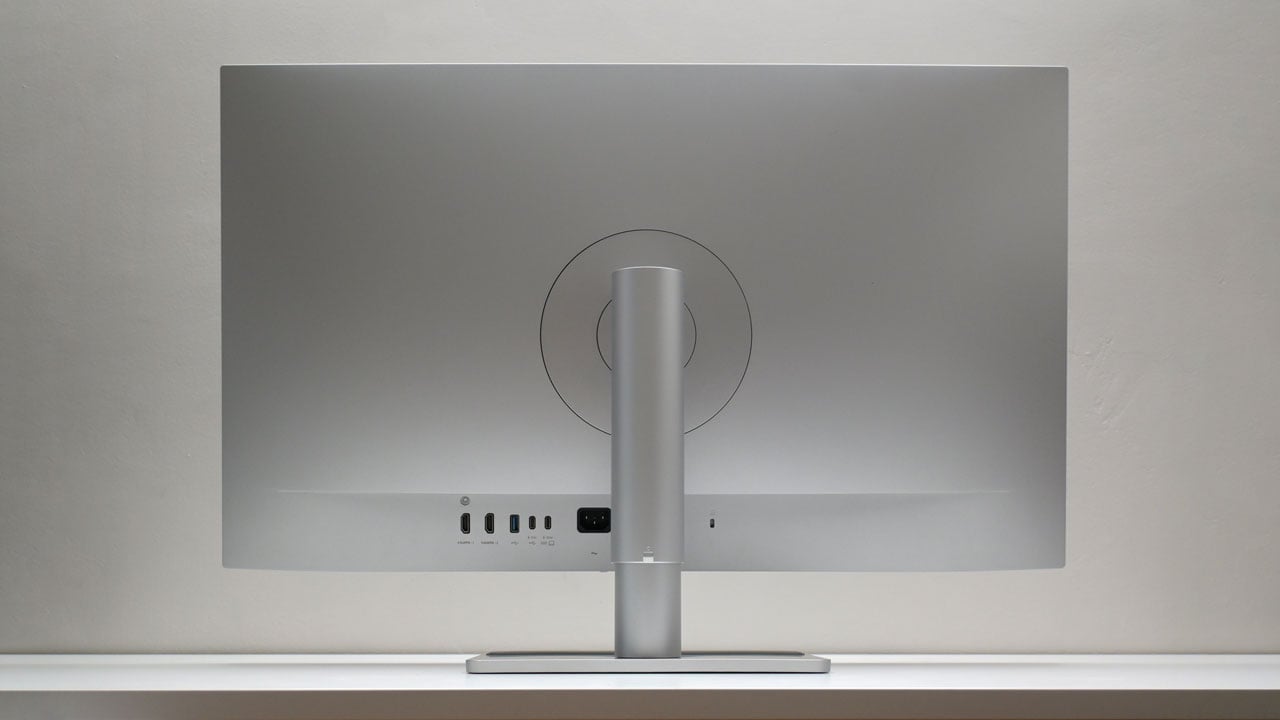
The MA320U is part of BenQ’s professional monitor lineup designed specifically for MacBook owners. It features a sleek, minimalist 32″ 4K display, supports 90 W charging, and can serve as a hub for various Apple devices.
Disclosure: BenQ provided us with the MA320U for review, but the brand has no influence over the content of this in-depth evaluation.
Table of Contents:
Technical Specifications
The BenQ MA320U offers a 31.5-inch, 2160p (3840 x 2160) IPS panel, with a maximum SDR and HDR brightness of 550 and 600 cd/m2 respectively. Contrast ratio is at 1,300:1, while color coverage is rated at 97% P3. Panel size and resolution combined, the monitor offers 140 PPI, and if that is not enough, BenQ also offers the MA270U, which is the 27-inch version with 163 PPI. Both displays are available via BenQ authorized stores nationwide.
| Display | |
|---|---|
| Panel Size | 31.5 in |
| Panel/Backlight | IPS |
| Surface Treatment | Matte (BenQ Nano Matte Panel) |
| Resolution | 2560 x 1440 (16:9) |
| Pixels per Inch | 140 |
| Refresh Rate | 60 Hz |
| Variable Refresh Rate | N/A |
| Brightness | 550 cd/m2 (SDR), 600 cd/m2 (HDR) |
| Contrast Ratio | 1,300:1 |
| Response Time | 5 ms (GtG) |
| Color Coverage | 99% sRGB, 97% DCI-P3 |
| Color Depth | 10-bit |
| Connectivity | |
| Display | 2x HDMI 2.0, DisplayPort 2.1, USB Type-C (DP-Alt) |
| USB | 2x USB 3.1 Type-A, 2x USB Type-C (DP-Alt + PD 90 W, PD 15 W) |
| Audio | 3.5 mm (Out), 2x 3 W speakers |
| Ergonomics | |
| VESA Mount | 100 x 100 mm |
| Pivot | +90°/-90° |
| Swivel | +15°/-15° |
| Tilt | -5°/+20° |
| Lift | 115 mm |
| Eye-care | Flicker-free, Low Blue Light, B.I.+ Gen2, ePaper |
| Dimensions | |
| Length | 424.4 mm |
| Width | 714.5 mm |
| Height | 82.7 mm |
| Weight | 6.05 kg (without stand) |
Packaging and Accessories
The BenQ MA320U comes in a plain box, safely cushioned by a two-piece internal carton packaging. It’s the first monitor I’ve seen packaged this way, and it’s genuinely easier to unbox. You just lift off the section, unlike the usual hassle with styrene packaging.

Scope of delivery are as follows:
- BenQ MA320U monitor
- Power cable
- HDMI 2.0 cable
- USB cable
- Documentation(s)
Design, Build and Connectivity
The BenQ MA320U is a sleek display with a minimalist design, clearly tailored for MacBooks with its smooth edges and its silver finish. While it boasts a bezel-less look, there’s still a sizable portion of the frame beneath the screen.

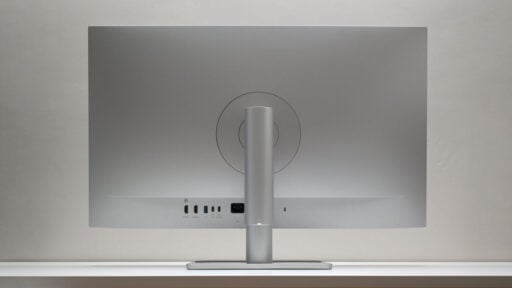
The back takes cues from the iMac, with rear-facing I/O that makes it easier to access. From this angle, the chunky stand is visible, offering smooth pneumatic height adjustment tailored to the monitor’s weight. Little details like these make the display a joy to use.

Display options include dual HDMI 2.0 ports and a single USB Type-C port that supports DP Alt Mode and 90 W charging. The Type-C port is great for connecting a MacBook with just one cable, while the HDMI ports work well for desktop devices like the Mac Mini.

Other connectivity options include another USB Type-C for data and up to 15 W charging, dual USB Type-A ports for data, and a 3.5 mm audio out for when you prefer not to use the built-in speakers.
Ergonomics
The BenQ MA320U is a 32-inch monitor boasting a 4K resolution, giving it a healthy pixel density of 140 PPI. While the difference from a 27-inch 4K display isn’t massive, it’s still noticeable, with the smaller screen feeling a bit closer to an Apple Retina display. That said the MA320U remains a sharp and impressive screen all around. On that note, BenQ’s Nano Matte Panel stands out for keeping the display clear even in bright or harsh lighting. If you prefer a glossy finish, the MA320UP is available as an alternative.

The MA320U features a flexible stand that lets you adjust the height up to 115 mm, swivel 15°, and tilt from -5° to 20°. It can also rotate a full 90° for a vertical setup and has a padded base perfect for your phone or other items. Plus, its VESA compatibility makes it easy to mount on a monitor arm or wall.
OSD Menu
The MA320U’s so-called OSD menu is controlled by a 5-axis joystick, though it’s pretty bare-bones. It only includes brightness, volume, input selection, and a QR code linking to their Display Pilot 2, which fills in the features the OSD itself lacks.

Software
While the OSD is underwhelming, Display Pilot 2 makes up for it with some handy features. It covers what you’d expect from an OSD, but its real highlight is how effortlessly it connects to your MacBook. This includes synchronized controls and Focus Mode, along with the option to match your MacBook’s display settings using BenQ’s ICCsync.

Display Pilot 2 is more than just companion software; it’s essential to unlock the full potential of the MA320U. While it would be nice if it included a KVM, that’s easy to overlook given the impressive range of features and options available to explore.

The UI of the Display pilot 2 already resembles a Mac’s, but it would be great to have percentages displayed for all the sliders, similar to the resolution scaling settings.
OSD Presets
The ‘User’ preset is our baseline for calibrating the MA320U, but it can be skipped since installing Display Pilot 2 will automatically apply a decent ICC profile. The sRGB and Coding mode pairs nicely with it.
| Spyder5 ELITE | OSD Settings | ||||
|---|---|---|---|---|
| Settings | Brightness (cd/m²) | Black Level (%) | Contrast (:) | White Point (K) |
| M-book | 491.9 | 0.41 | 1200:1 | 7100 |
| Display P3 | 489.8 | 0.78 | 628:1 | 7100 |
| sRGB | 230.5 | 0.20 | 1130:1 | 6700 |
| Cinema | 491.4 | 0.68 | 723:1 | 6900 |
| Game | 479.2 | 1.67 | 287:1 | 6900 |
| Coding | 167.8 | 0.14 | 1170:1 | 6300 |
| ePaper | 115.4 | 0.14 | 820:1 | 5000 |
| User | 506.3 | 0.43 | 1170:1 | 6900 |
| HDR | 220.7 | 0.45 | 490:1 | 6900 |
OSD settings are as follows:
- Preset = User
- Brightness = 16 (120 cd/m²)
- Contrast = 50
- Color = R100, G100, B100
- Color Temperature = 6500K
- Gamma = 2.2
You can request the calibrated ICC profile for the MA320U by email through the contact page. Keep in mind that results might differ between units due to normal manufacturing tolerances and panel variations.
Gamut
The MA320U performed well in the SpyderPro color gamut test, achieving a flawless 100% in sRGB, 93% in DCI-P3, but only reaching 87% in AdobeRGB and around 83% of the NTSC standard.
| SpyderPro | Gamut, Percent (%) | ||||
|---|---|---|---|---|
| Color Space | sRGB | AdobeRGB | DCI-P3 | NTSC |
| Measured | 100 | 87 | 93 | 83 |
Tone Response
The tested gamma standards are off by 0.1, which isn’t a big deal since we could easily remedy this with the calibrated profile. If had to choose (no calibration), I’d go with sRGB for its slightly better curve compared to Gamma 2.2. For general content, I’d opt for the Gamma 2.4 setting.
| SpyderPro | Tone Response, Gamma (γ) | ||||||
|---|---|---|---|---|---|---|
| Settings | sRGB | 1.8 | 2.0 | 2.2 | 2.4 | 2.6 |
| Measured | 2.1 | 1.7 | 1.9 | 2.1 | 2.3 | 2.5 |
Brightness and Contrast
The MA320U delivers excellent SDR performance, reaching a peak luminance of 507.4 cd/m² at full brightness, more than sufficient for virtually any indoor setting. The contrast is rock solid as well, outperforming most IPS panels I’ve tested.
| SpyderPro | Brightness and Contrast, SDR | ||||
|---|---|---|---|---|
| Settings | Brightness (cd/m²) | Black Level (%) | Contrast (:) | White Point (K) |
| 0% | 48.8 | 0.04 | 1210:1 | 6400 |
| 25% | 162.9 | 0.14 | 1140:1 | 6600 |
| 50% | 289.8 | 0.22 | 1290:1 | 6700 |
| 75% | 409.8 | 0.33 | 1250:1 | 6800 |
| 100% | 507.4 | 0.41 | 1240:1 | 6800 |
The MA320U supports HDR10 and VESA DisplayHDR 600. While it’s definitely HDR-capable, I won’t call it impressive – just enough to meet the mid-tier HDR standard. In fact, given its contrast ratio, the panel would technically fall under DisplayHDR 400 certification.
Screen Uniformity
The MA320U scores an average Delta E of 1.6 in SpyderPro’s screen uniformity test. While individual points on the panel vary from 0.0 to 2.9, the display consistently delivers good color uniformity.

Brightness uniformity is fairly acceptable, and it’s definitely not the best I’ve seen, making this one area where the display falls short.

Color Accuracy
The MA320U delivers professional-grade color accuracy, boasting a Delta E average of 1.81 across all tested color patches.

Response Time
The MA320U isn’t built for gaming, and it shows. Although it delivers flawless RGB overshoot, its perceived response time sits at 8.23 ms. Still, while it’s not ideal for competitive play, it’s perfectly enjoyable for casual gaming, especially with HDR-compatible titles.

Input Lag
The MA320U has an average input lag of 16.13 ms, making it far from ideal for competitive gaming, as mentioned before.
Power
The MA320U draws 17.6 W at 0% brightness and gradually rises to 55.1 W at maximum brightness. At the calibrated setting of 16% brightness level (120 cd/m²), it uses about 23.1 W.
Final Thoughts
The BenQ MA320U is a well-executed monitor for MacBook users who want a capable, no-fuss external display. At ₱36,990, you are paying a premium, but what you get in return is a sharp 32-inch 4K panel with solid color accuracy, excellent SDR performance, and a thoughtfully designed hub that keeps your desk clean with a single USB-C cable. The iMac-inspired aesthetics are a nice touch, and the pneumatic stand is the kind of quality-of-life detail that makes daily use genuinely pleasant.
That said, the MA320U is clearly built for productivity, not performance. Its input lag and response times put it out of contention for competitive gaming, and the HDR implementation is more of a checkbox than a major selling point. The OSD is also surprisingly bare-bones for a monitor at this price, leaving much of the heavy lifting to Display Pilot 2. A software that, to its credit, does a good job, but should not be a prerequisite for basic calibration control.
If you are a MacBook user looking for a large, polished display to anchor your workstation, the MA320U is a strong option. It does exactly what it sets out to do, and it does it well.
BenQ MA320U Monitor ₱36,990

Product Name: MA320U
Product Description: The BenQ MA320U is a 32” 4K 3840x2160 monitor built for the MacBook Pro/Air.
Brand: BenQ
Summary
The BenQ MA320U is a 32-inch 4K IPS monitor built around the Apple ecosystem, offering single-cable 90 W USB-C connectivity, a clean silver design, and solid color accuracy backed by BenQ’s Display Pilot 2 software.
Pros
- Sharp 4K panel with good pixel density at 140 PPI
- Excellent SDR brightness and contrast for an IPS display
- Professional-grade color accuracy with Delta E average of 1.81
- 90 W USB-C charging keeps MacBook cable clutter minimal
- Nano Matte panel handles reflections well in bright environments
- Thoughtful ergonomics with smooth pneumatic height adjustment
- Attractive, Mac-compatible design with iMac-inspired rear I/O layout
- Display Pilot 2 adds meaningful software features
Cons
- High input lag (16.13 ms avg) and slow response times
- HDR performance does not match the DisplayHDR 600 certification
- OSD is too bare-bones for a monitor at this price point
- AdobeRGB coverage fall short compared to P3 performance
- Premium pricing may be hard to justify for non-Mac users