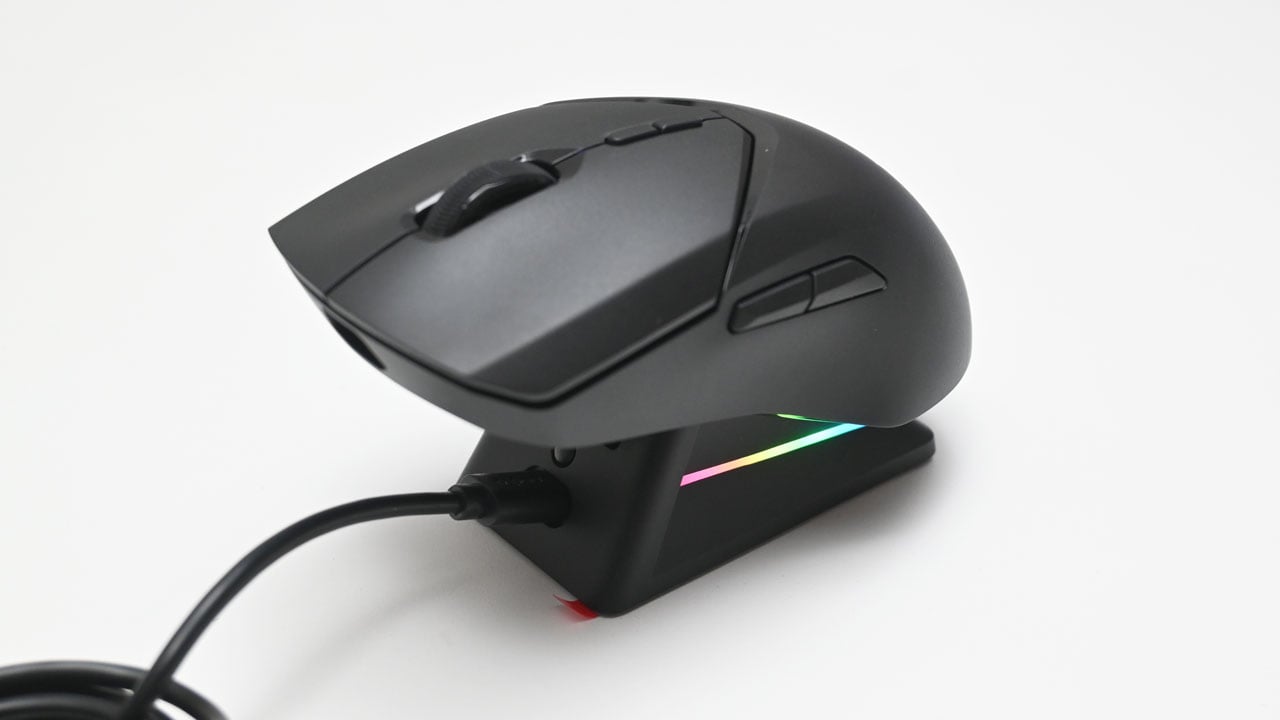
Up for a quick review is the Rapoo VT9SE Plus, a wireless gaming mouse that seems to be a more frugal take on the VT9Pro, sporting a ₱2,400 PHP price tag.
Disclosure: Rapoo sent the VT9SE Plus for the purpose of this review – free of charge. The brand did not ask me to say anything particular about it.
Table of Contents:
Technical Specifications
The Rapoo VT9SE Plus packs a PAW 3311 sensor capable of reaching 12,000 DPI with a 1000 Hz polling rate. Housed in a medium-sized shell, it weighs just 59 grams and boasts up to 60 hours of battery life, according to the manufacturer.
| Mouse | |
|---|---|
| Design | Semi-ambidextrous |
| Type | Optical (PAW 3311) |
| Resolution | 12000 DPI |
| Speed | 300 IPS |
| Acceleration | 35 G |
| Polling Rate | 1000 Hz |
| Connectivity | USB 2.0, 2.4 GHz RF |
| Switch | |
| Type | Rapoo C+ Click |
| Mount | Soldered |
| Dimensions | |
| Length | 124.8 mm |
| Width | 67.1 mm |
| Height | 38.7 mm |
| Weight | 59 g |
Packaging and Accessories
The Rapoo VT9SE Plus comes in a simple multi-part packaging.

Scope of delivery are as follows:
- Rapoo VT9SE Plus Wireless Mouse
- USB Type-C to Type-A cable
- 2.4 GHz wireless dongle
- Charging dock
- Documentation(s)
Design, Build and Connectivity
Rapoo has greatly improved their mouse designs with the VT9SE Plus, which now looks like a proper esports-grade gaming mouse, especially when compared to their earlier models such as the V300SE. It is technically smaller compared to the said mouse and yet retains the medium size form factor.

The VT9SE Plus has a similar profile to the V300SE, but with a gentler slope and a lower maximum z-height, making it a bit more comfortable for smaller hands. Designed as a semi-ambidextrous mouse, it features two navigation buttons on the far left side, positioned just above the thumb area.

The Rapoo VT9SE Plus comes with five PTFE skates. This section features the power button, a customizable button, and a magnetic cover for the 2.4 GHz dongle and the charging dock.

The Rapoo VT9SE Plus could be charged and connected to your PC via USB interface should you wish to do so.

Ergonomics
The Rapoo VT9SE Plus has a length of roughly 124.8 mm, a grip area of around 67.1 mm, and a height of about 38.7 mm at its peak.

This medium-sized gaming mouse is ideal for medium to large hands, regardless of grip style. Weighing about 57 grams (59 grams with the cover), it’s impressively light.
Software
The VT9SE Plus works seamlessly with the Rapoo Game Dev software, which is simple and user-friendly. It offers five menus with clear, straightforward options. The System menu, for instance, focuses mostly on settings related to the sensor and switches. However, the absence of LOD settings is a bit disappointing.

The Keys menu lets you map or bind buttons to the keyboard, media controls, macros, or other functions. This essentially allows you to customize every button on the VT9SE Plus to suit your preferences.

Input Lag
OSLTT test results show that the Rapoo VT9SE Plus has average input lag performance, with a 20.22 ms average on wireless and 18.99 ms on wired. These are not esports worthy figure, but it will do for public lobbies. We’ve seen similar results from the V300SE.
CPI/DPI Accuracy
The Rapoo VT9SE Plus offers seven CPI/DPI settings: 800, 1200, 1600, 2400, 3200, 6400, and 12000. After testing the accuracy of each level, I found the biggest deviations occurred at 800, 6400, and 12000 DPI.
SRAV
Like the V300SE before it, the speed-related acceleration variance from 150 m/s onward leaves much to be desired.
Polling Rate
In terms of polling rate performance, the VT9SE Plus does well in this benchmark, both for wired and wireless connections.
Actuation Force
The actuation force required to push the left button is about 50.4 cN, whereas the right button requires 59 cN. The wheel is three times heavier to actuate at 158.6 cN.
Final Thoughts
The Rapoo VT9SE Plus is a clear step up in design from the V300SE, with a slimmer profile and lower peak height that should suit smaller hands a bit better. At roughly 57-59 grams (with and without cover), it’s a genuinely light mouse, and the semi-ambidextrous shape with side navigation buttons keeps it flexible for different grip styles.
Where it falls short is performance. Input lag sits around 19 to 20 ms on both wired and wireless, which is fine for casual play but not something serious competitive players will want. CPI accuracy holds up reasonably well through the middle of the range but drifts more at 800, 6400, and 12000 DPI. Speed-related acceleration variance is also a weak point past 150 m/s, a carryover issue from the V300SE.
At ₱2,400, the VT9SE Plus is a reasonable pick for casual and budget-conscious gamers who want a comfortable, lightweight mouse. Just don’t go in expecting esports-level responsiveness, since the numbers here land in average territory rather than exceptional.
Rapoo VT9SE Plus ₱2,400

Product Name: VT9SE Plus
Product Description: A lightweight, semi-ambidextrous wireless gaming mouse featuring a PAW 3311 optical sensor, up to 12,000 DPI, 1000 Hz polling rate, and up to 60 hours of battery life.
Brand: Rapoo
Summary
The Rapoo VT9SE Plus is a lightweight, semi-ambidextrous wireless gaming mouse with a PAW 3311 sensor, 12,000 DPI, and 1000 Hz polling rate. It improves on the V300SE’s design but carries over some of the same performance quirks, all at a ₱2,400 price point.
Pros
- Improved, more comfortable design compared to the V300SE
- Very light at around 57-59 grams
- Stable 1000 Hz polling rate on both wired and wireless connections
- Long battery life rating of up to 60 hours
- Convenient charging dock included
- Reasonable ₱2,400 price point
Cons
- Input lag averages around 19 to 20 ms, not competitive-grade
- CPI accuracy drifts more noticeably at 800, 6400, and 12000 DPI
- SRAV worsens past 150 m/s, same issue seen on the V300SE