Magnetic switches typically demand a premium, but the Magcore65 Lite brings that feature to a budget-friendly price at just under $80 USD. In this review, we’re checking out if this 65% tri-mode gaming keyboard from EPOMAKER has the making of a genuine budget disruptor at its slated price point.
Disclosure: EPOMAKER provided the Magcore65 Lite for this review, but all thoughts and opinions shared here are entirely my own.
Table of Contents:
Technical Specifications
The Magcore65 Lite packs a lot of features into a portable frame. It could toggle between three systems via its tri-mode connectivity, and offers both DKS and SOCD support to provide the precision that gamers and coders require. Battery life is substantial, coming in with a 4000 mAh capacity which is more than enough to keep a charger away for weeks.
| Keyboard | |
|---|---|
| Design | 65% |
| Type | Mechanical, Inductive |
| Polling Rate | 1000 Hz, 125 Hz (Bluetooth) |
| Connectivity | USB 2.0, 2.4 GHz RF, Bluetooth 5.0 |
| Switch | |
| Type | EPOMAKER Core Switch |
| Mount | Gasket, FR plate, Swappable |
| Dimensions | |
| Length | 323.7 mm |
| Width | 117.7 mm |
| Height | 43.2 mm |
| Weight | 750 g |
Packaging and Accessories
EPOMAKER packed the Magcore65 Lite in a simple yet effective packaging.

Scope of delivery are as follows:
- EPOMAKER Magcore65 Lite keyboard
- Braided USB Type-C to Type-A cable
- Keycap and switch puller combo
- 3x Extra PBT keycaps
- 3x Extra switches
- Documentation(s)
Design, Build and Connectivity
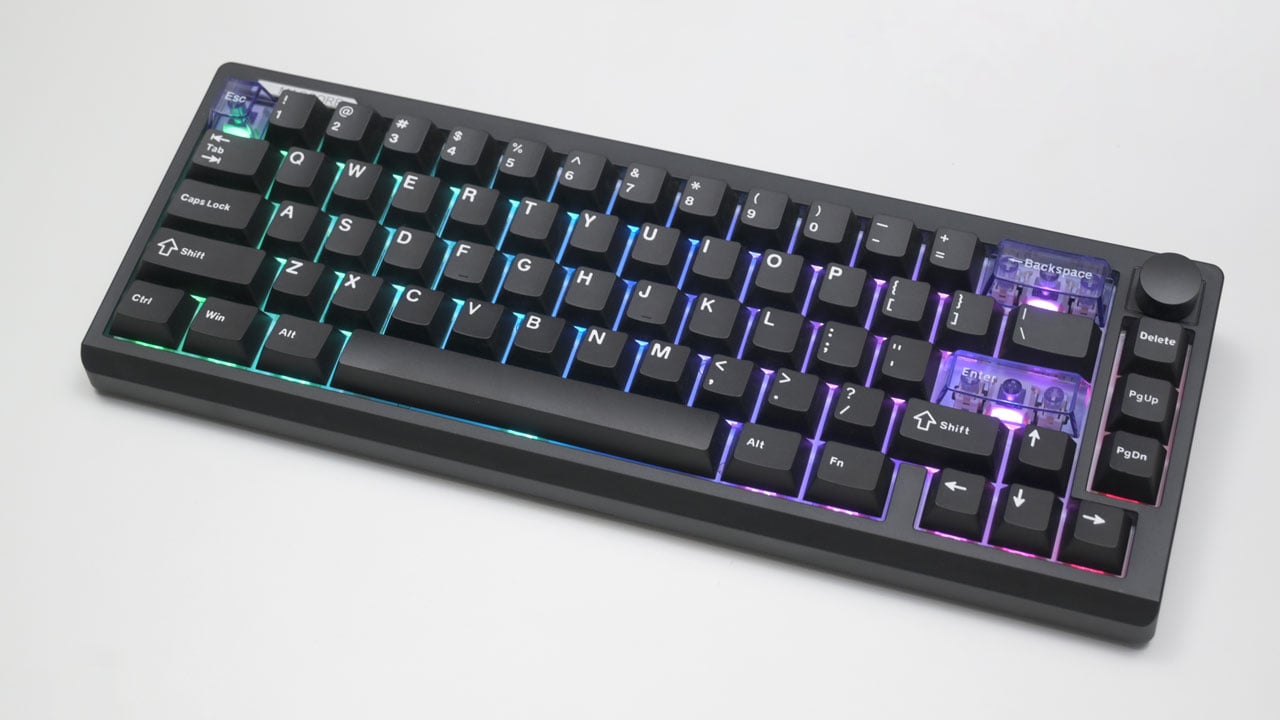
The Magcore65 packs a surprisingly dense heft into its compact 65% frame. Its all-black, no-nonsense design made it look like it could belong on a professional desk, provided that you use the extra PBT keycaps to replace the translucent ones installed. Clean fonts and its matte finish also helps to keep things look understated.

The Magcore65 Lite features four silicon feet and three levels of angle adjustment. Under its plastic base, silicon and foam padding are installed to help dampen the keyboard’s sound.

You get 2.4 GHz, USB-C, and Bluetooth connectivity with the Magcore65 Lite. However, the dongle holder is rather loose. I’ve already dropped it a couple of times because it won’t stay put. Literally the only complaint I have thus far.

Ergonomics
The Magcore65 Lite comes in a standard 65% layout but with a customizable rotary encoder. You’ll lose the numpad with this layout, but you’ll gain a ton of desk space for your mouse. I like that EPOMAKER considered to add a beveled edge towards the palm area, making it easy enough to use without a palm rest even at its lowest settings. This helps mechanical keyboard newbies to easily adjust as well.

The Magcore65 Lite comes with EPOMAKER’s own Core switches. These hot-swappable inductive linear switches use a feather-light 30 gF actuation, though the ± 10 gF deviation means you might notice some slight inconsistency between keys. You get 3.5 mm of total travel which is 0.5 mm shallower than the standard Cherry MX switch. EPOMAKER also packed in additional silicon and foam dampeners under its resin plate, making this a great board to type with – zero modifications required.
Software
EPOMAKER’s web UI keeps things simple, ditching bloat for a clean design. You land straight on the KeyMapping page after selecting your device, with four other tabs just a click away. This keyboard gets four layers of mapping along with a combined key functionality. It’s a good set of feature if you want to squeeze every ounce of performance out of a 65% board. The only downside I can see is that it requires an internet connection.

Lighting effects are plenty, with 18 modes to select. I don’t bother with RGB much, but if you’re picky about your palette, you can dial in a specific look using the color wheel, RGB codes, or HEX values.

Finally, we get to explore the QuickTrigger options, where you can tweak the Magcore65’s actuation distance and enable Rapid Trigger Mode, letting a key reset at any height without needing to return to its original position. Common inductive switch features supported includes DKS, MT, MPT, SOCD, TGL, and END. SOCD is probably the feature you are looking for if you are into competitive gaming, especially FPS.

Input Lag
The Magcore65 Lite nails our input lag tests. USB and 2.4 GHz sit neck and neck, averaging 2.23 ms and 2.33 ms respectively, so you get wired-level performance without the clutter. Bluetooth hits 17 ms which is a solid number for general office work, but you’ll want to stick to the dongle for anything that requires fast reflexes.
Polling Rate
The Magcore65 Lite hits a perfect 1000 Hz polling rate across both wired and 2.4 GHz wireless modes. The keyboard delivers consistent 1 ms report intervals, which is exactly what you want for gaming. Bluetooth drops the polling to 125 Hz, but that’s the standard ceiling for the protocol.
Actuation Force
The Magcore65’s spacebar needs a bit more force than any other key on the keyboard. I would still rate the keyboard high due to its consistent result which is far from the rated ±10 variance.
Final Thoughts
Rapid Trigger and SOCD usually demand a premium price tag, but EPOMAKER shoves them into a budget frame that actually feels great to type on. This 65% keyboard proves you don’t need to spend at least twice to get a competitive edge in input demanding games.
With the Magcore65 Lite, you get fast 2.4 GHz wireless connectivity that could match wired performance. EPOMAKER nailed the typing experience, too. They packed the hefty 750-gram chassis with silicon and foam dampeners, creating a surprisingly premium sound profile right out of the box. Those 30 gF inductive switches feel incredibly light and mostly consistent, plus the web software lets you dial in custom actuation points to match your exact requirements.
Battery life is something I never expected to be good, but its dual 2000 mAh battery capacity is surprisingly great. This keyboard has been my daily driver for weeks, and I still haven’t reached for a charging cable. Granted, I do not use RGB lighting so your mileage may vary.
We do need to talk about the annoying design choices though. EPOMAKER completely botched the USB dongle holder. The slot holds the dongle so loosely that gravity alone pulls it out, meaning you’ll likely lose the tiny receiver if you toss the board into a backpack. Note that you must maintain an active internet connection to adjust your RGB settings or remap keys because EPOMAKER relies entirely on a web-based utility.
Those minor flaws barely scratch the immense value EPOMAKER offers here. You secure a reliable, lightning-fast gaming weapon that doubles as a comfortable daily typing tool. Gamers looking to test the waters of magnetic switches should absolutely put the Magcore65 Lite at the very top of their list. It genuinely is a good 65% keyboard in the budget scene.
EPOMAKER Magcore65 Lite $79.99

Product Name: Magcore65 Lite
Product Description: The EPOMAKER Magcore65 Lite is a 65% tri-mode gaming keyboard with hot-swappable inductive switches.
Brand: EPOMAKER
Summary
The EPOMAKER Magcore65 Lite delivers high-end magnetic switches for under 80 bucks, securing premium features like Rapid Trigger and SOCD in a compact frame. The board absolutely nails wireless performance and typing feel.
Pros
- Proper inductive switches in a $80 price tag
- Low latency 2.4 GHz wireless
- Sound and feel great right out of the box
- 4000 mAh battery life
Cons
- Loose dongle slot