
The ASUS ROG Swift OLED PG27AQWP-W is a 27-inch QHD monitor designed around the latest Tandem OLED panel technology. By stacking two light-emitting layers, this display aims to address the common OLED trade-offs of brightness and burn-in risk. On the connectivity front, the inclusion of full-bandwidth DisplayPort 2.1 makes it one of the more future-proofed displays currently available. Our testing focuses on how these hardware changes translate to real-world performance in both high-refresh esports and HDR content consumption.
Disclosure: The review unit for the ROG Swift OLED PG27AQWP-W was provided by ASUS. However, this is an independent evaluation. ASUS had no editorial input, nor did they preview or approve the content, testing data, or final verdict before publication.
Table of Contents:
Technical Specifications
The ASUS ROG Swift OLED PG27AQWP-W arrives as a hardware-level iteration of the modern 27-inch gaming monitor. Its primary distinction lies in the adoption of LG’s Tandem OLED panel, which utilizes a dual-layer structure to improve peak brightness and panel longevity compared to standard WOLED. In addition to a native 540 Hz refresh rate at 1440p, this model is among the first to implement DisplayPort 2.1 (UHBR20), providing the bandwidth necessary for high-refresh gaming without heavy reliance on Display Stream Compression (DSC).
| Display | |
|---|---|
| Panel Size | 26.5 in |
| Panel/Backlight | WOLED |
| Surface Treatment | Glossy (TrueBlack Glossy) |
| Resolution | 2560 x 1440 (16:9) |
| Pixel Pitch | 0.229 mm |
| Refresh Rate | 540 Hz |
| Variable Refresh Rate | FreeSync Premium Pro, G-SYNC Compatible |
| Brightness | 1500 cd/m2 |
| Contrast Ratio | 1,500,000:1 |
| Response Time | 0.02 ms (GtG) |
| Color Coverage | 135% sRGB, 99.5% DCI-P3 |
| Color Depth | 10-bit |
| Connectivity | |
| Display | 2x HDMI 2.1, DisplayPort 2.1 |
| USB | 3x USB 3.2 Gen 1 Type-A |
| Audio | 3.5 mm (Out) |
| Ergonomics | |
| VESA Mount | 100 x 100 mm |
| Pivot | +90°/-90° |
| Swivel | +30°/-30° |
| Tilt | -5°/+20° |
| Lift | 110 mm |
| Anti-strain | Flicker-Free |
| Dimensions | |
| Length | 605.6 mm |
| Width | 631 mm |
| Height | 369.4 mm |
| Weight | 4.54 kg (without stand) |
Packaging and Accessories
The ROG Swift OLED PG27AQWP-W arrives in a massive box, securely cushioned by a two-piece molded pulp insert for maximum protection.

Scope of delivery are as follows:
- ASUS ROG Swift OLED PG27AQWP-W monitor
- Color pre-calibration report
- DisplayPort 2.1 (DP80) cable
- HDMI Ultra High Speed Cable
- Microfiber cloth
- Power cord
- Quick start guide
- ROG pouch
- ROG sticker
- USB 3.2 cable
- VESA mount kit
- Warranty Card
Design, Build and Connectivity
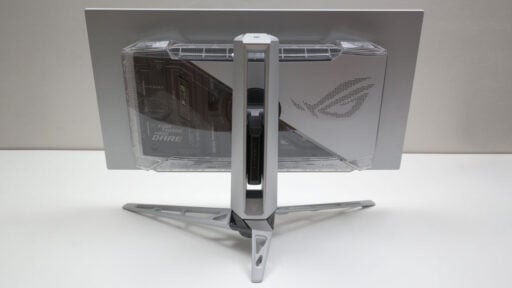
Moving away from the standard ROG design language, the PG27AQWP-W adopts a silver finish intended for minimalist or white-themed setups. This is paired with a redesigned metal tripod stand featuring a hollow architecture, which reduces weight while maintaining stability. The display panel is truly glossy, prioritizing image clarity and contrast. However, the reflective nature of this finish requires consideration for gamers in environments where multiple or direct light sources could be found.

The PG27AQWP-W features a semi-transparent section on its rear enclosure that reveals a portion of the internal components. This design serves as a nod to the transparent gaming hardware of the late 1990s – a visual style that remains rarely seen in the gaming market.

The I/O is tucked into the central section at the back, featuring a DisplayPort 2.1a (UHBR20) port that provides a massive 80 Gbps bandwidth for 1440p at 540 Hz without needing compression. This is complemented by two HDMI 2.1 ports, a USB hub with three USB 3.2 Gen 1 Type-A ports, and a 3.5mm earphone jack.

Ergonomics
The 26.5-inch ROG Swift OLED PG27AQWP-W leverages a Tandem OLED structure, stacking electroluminescent layers to crank up brightness and efficiency. To keep text sharp, it pairs a fourth-gen WOLED (RGWB) layout with a Clear Pixel Edge algorithm. The standout feature is the 0% haze glossy coating; it preserves deep blacks in lit rooms and effectively kills glare the second the screen turns on. This implementation appears effective in practice, as no glare is perceptible when the display is active.

The ROG Swift OLED PG27AQWP-W features a hollow tripod stand that provides 110 mm of height adjustment, 60 degrees of total swivel, 25 degrees of tilt, and 90 degrees of pivot for portrait orientation. The top of the stand includes a integrated 1/4″ tripod socket for mounting peripheral devices such as cameras or lighting. For alternative mounting solutions, the chassis is compatible with 100 x 100 mm VESA wall mounts and monitor arms.
OSD Menu
The PG27AQWP-W features a four-layer OSD menu controlled via a joystick-based navigation system. The ‘Gaming’ menu is positioned at the top of the menu, providing access to the monitor’s presets and primary performance settings. This section includes an FPS counter that can be configured as either a numeric display or a bar graph.

The ‘Image’ menu allows for the adjustment of specific parameters, including brightness, contrast, gamma, and color temperature. Depending on the active profile or preset, certain configuration options may be restricted or locked.

These color settings are particularly relevant for the PG27AQWP-W, as the Tandem OLED panel provides a 25% increase in color volume compared to previous generations. The ‘Color’ menu enables users to either utilize the full 99.5% DCI-P3 gamut or clamp the output to sRGB for more accurate color reproduction during web and productivity tasks.

The ‘OLED Care’ menu on the PG27AQWP-W contains a suite of software-based protections designed to mitigate the risk of permanent image retention and manage the thermal output of the Tandem OLED panel.

Software
The ASUS Display Widget provides a desktop-based interface for managing the OSD menu, serving as an alternative to the physical hardware controls. This allows users to configure the PG27AQWP-W’s settings directly within the operating system environment.

OSD Presets
The ‘Racing’ preset was selected as the calibration baseline among the available picture modes for the PG27AQWP-W. For those without access to calibration hardware, the ‘sRGB Cal’ profile serves as a viable alternative, providing accurate performance in its default state.
| Spyder5 ELITE | OSD Settings | ||||
|---|---|---|---|---|
| Settings | Brightness (cd/m²) | Black Level (%) | Contrast (:) | White Point (K) |
| Scenery | 299.1 | 0.00 | 299070:1 | 7500 |
| Racing (Default) | 290.6 | 0.00 | 290600:1 | 6900 |
| Cinema | 261.9 | 0.00 | 261850:1 | 7900 |
| RTS/RPG | 274.9 | 0.00 | 274910:1 | 7400 |
| FPS | 294.2 | 0.00 | 294180:1 | 6900 |
| sRGB Cal | 113.9 | 0.00 | 113920:1 | 7000 |
| MOBA | 277.2 | 0.00 | 277210:1 | 7400 |
| Night Vision | 24.7 | 0.00 | 24730:1 | 6800 |
| User | 250.6 | 0.00 | 250580:1 | 7400 |
OSD settings are as follows:
- Preset = Racing
- Brightness = 38 (120 cd/m²)
- Contrast = 80
- Color = Wide
- Color Temperature = 6500K
- Gamma = 2.2
The calibrated ICC profile for the ASUS ROG Swift OLED PG27AQWP-W is available upon request via the contact page. Please note that results may vary between units due to inherent manufacturing tolerances and panel variance.
Gamut
In terms of color gamut coverage, the PG27AQWP-W achieved a measured 100% of the sRGB and 93% of NTSC color spaces. It also demonstrated high coverage in wider gamut, reaching 95% of AdobeRGB and 100% of the DCI-P3 color space standard. These results indicate the panel is suitable for color-critical tasks or professional level production.
| Spyder5 ELITE | Gamut, Percent (%) | ||||
|---|---|---|---|---|
| Color Space | sRGB | AdobeRGB | DCI-P3 | NTSC |
| Measured | 100 | 95 | 100 | 93 |
Tone Response
Tone response measurements using the Spyder5 ELITE indicate that the PG27AQWP-W tracks close to its intended gamma targets. The display measured 1.7 at the 1.8 setting and 2.0 at the 2.0 setting, while the 2.2, 2.4, and 2.6 settings yielded measured values of 2.1, 2.3, and 2.5, respectively. These results show a consistent -0.1 deviation across most of the higher gamma presets.
| Spyder5 ELITE | Tone Response, Gamma (γ) |
|||||
|---|---|---|---|---|---|
| Settings | 1.8 | 2.0 | 2.2 | 2.4 | 2.6 |
| Measured | 1.7 | 2.0 | 2.1 | 2.3 | 2.5 |
Brightness and Contrast
SDR brightness and contrast measurements show a peak luminance of 332.7 cd/m² at the 100% brightness setting. The monitor maintains exceptionally low black levels across the entire range, consistently measuring 0.00%. Due to these near-zero black levels, the measured contrast ratios are extremely high, scaling from 3,300:1 at 0% brightness up to 332,730:1 at maximum output.
| Spyder5 ELITE | Brightness and Contrast, SDR | ||||
|---|---|---|---|---|
| Settings | Brightness (cd/m²) | Black Level (%) | Contrast (:) | White Point (K) |
| 0% | 3.3 | 0.00 | 3300:1 | 6400 |
| 25% | 27.9 | 0.00 | 27850:1 | 6800 |
| 50% | 97.0 | 0.00 | 97020:1 | 6800 |
| 75% | 226.2 | 0.00 | 226180:1 | 6900 |
| 100% | 332.7 | 0.00 | 332730:1 | 7500 |
Now HDR performance measurements for the PG27AQWP-W demonstrate a significant increase in peak luminance at smaller window sizes. The display reached a peak brightness of 1,219.57 cd/m² at a 1% window, with output decreasing as the window size expanded, measuring 915.67 cd/m² at 4% and 740.90 cd/m² at 9%.
Brightness continues to scale downward as more of the screen is illuminated, reaching 428.85 cd/m² at a 25% window and 368.74 cd/m² at 50%. At a 100% full-field window, the monitor maintains a sustained brightness of 338.02 cd/m². These results reflect the behavior of the panel’s Automatic Brightness Limiter (ABL) when handling high-dynamic-range content.
Screen Uniformity
While individual color deviations range from a minimum of 0.23 to a maximum of 2.44, the PG27AQWP-W demonstrates strong out-of-the-box brightness uniformity with an average Delta E of 1.14

Luminance uniformity testing via the Spyder5 ELITE shows consistent brightness distribution across the panel. The center of the display serves as the reference point (0% deviation), with most surrounding sectors staying within a 1% to 3% variance range.

Color Accuracy
The PG27AQWP-W essentially bridges the gap between a competitive eSports display and a content creation monitor. While its 540 Hz speed is the headline, the Delta E < 2 (0.77 average) and 100% DCI-P3 coverage make it accurate enough for high-end video editing and color grading.

Response Time
Complementing its color precision is an industry-leading average perceived response time of 0.73 ms (0.3 ms best) and a lack of noticeable RGB overshoot, which allows the PG27AQWP-W to fully support its 540 Hz and 720 Hz refresh rates without ghosting or motion blur.

Input Lag
The PG27AQWP-W demonstrated exceptionally low latency performance. The Total Input Lag averages just 2.29 ms, with a minimum of 1.171 ms and a maximum of 3.12 ms, which is an elite result suitable for professional-grade competitive gaming.
Power
Starting from a baseline of 31.57W at 0% brightness, the power draw of the OLED PG27AQWP-W increases moderately to 36.73W at the 50% mark. Interestingly, the power demand accelerates more sharply in the upper quadrant, jumping nearly 11W between the 50% and 100% settings to reach a peak of 47.42W.
Final Thoughts
The ASUS ROG Swift OLED PG27AQWP-W represents a significant leap forward in the 1440p monitor landscape, successfully bridging the often-disparate worlds of hyper-competitive esports and high-fidelity content creation. By leveraging LG’s Tandem OLED technology, ASUS has effectively mitigated the traditional brightness limitations of OLED panels while retaining the perfect black levels and infinite contrast that make the technology so desirable.
For the competitive gamer, the headline 540 Hz refresh rate and the near-instantaneous response time deliver motion clarity that is currently unrivaled in the QHD space. The inclusion of DisplayPort 2.1 (UHBR20) is a critical, forward-thinking differentiator; it ensures that the monitor is not just a powerhouse for today’s GPUs but is ready to utilize the full uncompressed bandwidth of future hardware without relying on DSC.
In our testing, the monitor excelled in both speed and accuracy. It demonstrated a blistering 0.73 ms average response time and exceptionally low 2.29 ms total input lag, making it an ideal choice for top-tier esports. Simultaneously, it proved capable of professional creative work, offering 100% DCI-P3 color coverage and superb out-of-the-box color accuracy.
However, the monitor is not without its considerations. The glossy coating, while excellent for perceived contrast and clarity, demands light-controlled environments to avoid distracting reflections.
Ultimately, the PG27AQWP-W is a premium, no-compromise solution. It is arguably the best 1440p monitor currently available for users who demand the speed of a TN esports panel with the visual richness of a reference-grade OLED.
ASUS ROG Swift OLED PG27AQWP-W Monitor $1099

Product Name: ROG Swift OLED PG27AQWP-W
Product Description: The ASUS ROG Swift OLED PG27AQWP-W is a 26.5-inch QHD gaming monitor that sets a new standard for enthusiasts by combining an ultra-high 540 Hz refresh rate with next-generation Tandem OLED panel technology.
Brand: ASUS
Summary
The ASUS ROG Swift OLED PG27AQWP-W is a 27-inch QHD gaming monitor that sets a new benchmark for performance by combining a native 540 Hz refresh rate with LG’s Tandem OLED panel technology. This dual-layer OLED structure delivers impactful HDR performance, reaching a peak brightness of 1,219 nits, while maintaining the perfect blacks and infinite contrast inherent to OLEDs.
Pros
- 540 Hz refresh rate and near-instant response times eliminate motion blur
- Tandem panel technology offers significantly higher brightness and better lifespan than standard OLEDs
- Includes DisplayPort 2.1 (80 Gbps) to support next-gen graphics cards without compression
- 100% DCI-P3 coverage and high color accuracy make it excellent for content creation
- Extremely low input latency makes it perfect for competitive esports
Cons
- Glossy finish looks great but may struggle with glare in bright rooms