New AI workloads are becoming more advanced, and the amount of memory available to AI accelerators is a significant bottleneck. AMD’s Ryzen™ AI MAX+ systems offer a solution by allowing system RAM to be converted into dedicated graphics memory, enabling users to run larger, more capable AI models locally.
Table of Contents:
AMD’s Variable Graphics Memory Explained
AMD Variable Graphics Memory (VGM) is a feature available in Ryzen AI 300 series processors that lets you reallocate a portion of your system’s RAM to the integrated graphics processor through the BIOS. This is possible due to the unified memory architecture of modern Ryzen™ AI processors.
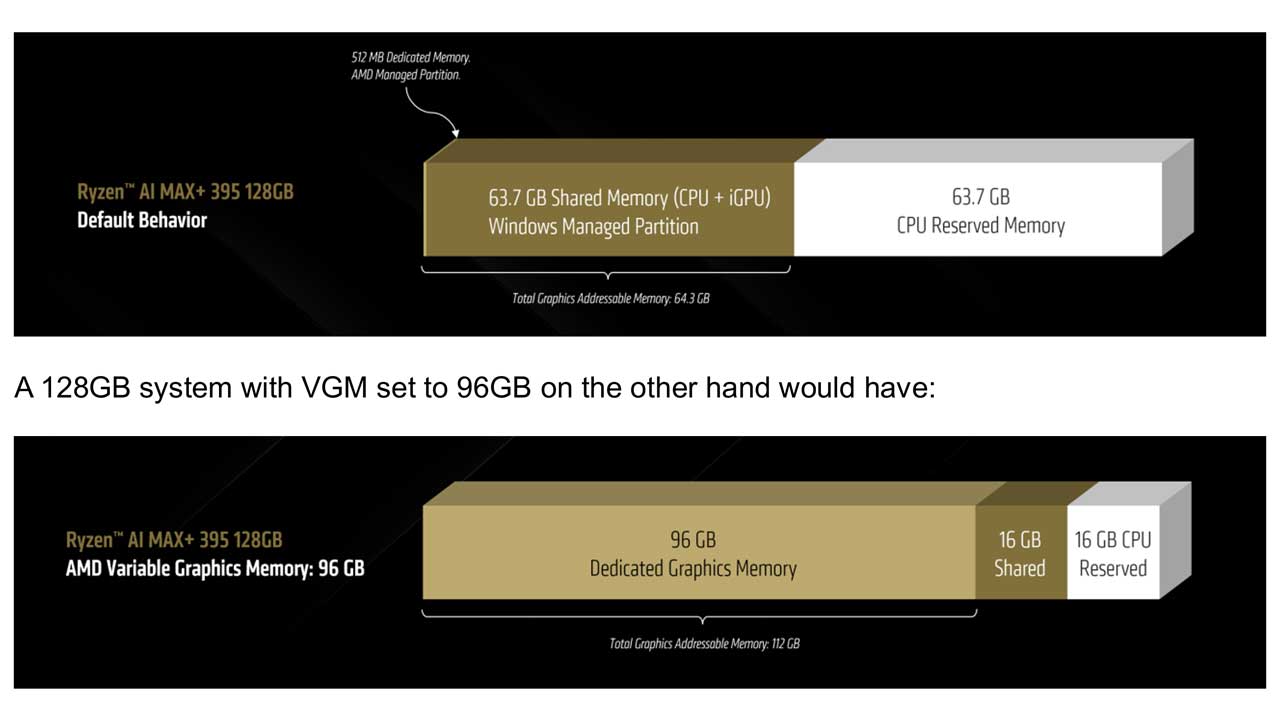
It’s important to understand that this “dedicated” graphics memory is different from “shared” graphics memory. In a typical Windows setup, half of your RAM is already shared with the integrated graphics but remains accessible to the CPU. When you use VGM to convert RAM to VRAM, it becomes “dedicated graphics memory” from the operating system’s perspective and is no longer available as system RAM. This creates a large, single block of memory for the iGPU, which is ideal for AI applications designed with VRAM in mind.
For example, a 128 GB system by default might have 512 MB of dedicated graphics memory and about 64 GB of total graphics-addressable memory. By setting VGM to 96 GB, you get 96 GB of dedicated graphics memory, and the total graphics-addressable memory increases to 112 GB.
Why Bigger AI Models Are Better
Generally, a larger AI model, as measured by its number of parameters, will produce higher quality results, though it will require more processing time and memory. This applies to both large language models (LLMs) and image generation models.
For instance, when asked “Is 9.11 greater than 9.9?”, a Llama model with 3 billion parameters answered incorrectly, while a 109-billion parameter version answered correctly with a detailed explanation.

The same principle holds true for image generation. The Stable Diffusion 3 Medium model, with 8 billion parameters, produces significantly more realistic and detailed images than the older Stable Diffusion 1.5 model, which has 0.9 billion parameters.
The Role of Precision and Quantization
Quantization is a process that reduces the memory footprint of AI models by converting their weights from higher precision formats (like FP16) to lower precision ones (like 4-bit). The most common type for local LLMs is 4-bit quantization.
While a 4-bit quantization level like Q4_K_M is acceptable for general use, it can lead to reduced accuracy in specialized tasks like coding. For higher accuracy, Q6 is often considered the minimum, with Q8 offering very high quality at the cost of larger memory requirements. Some models, like Google’s Gemma 3, use specialized techniques like Quantization Aware Training (QAT) which can offer superior performance.
Hardware Recommendations for Local AI
AMD provides recommendations based on user needs:
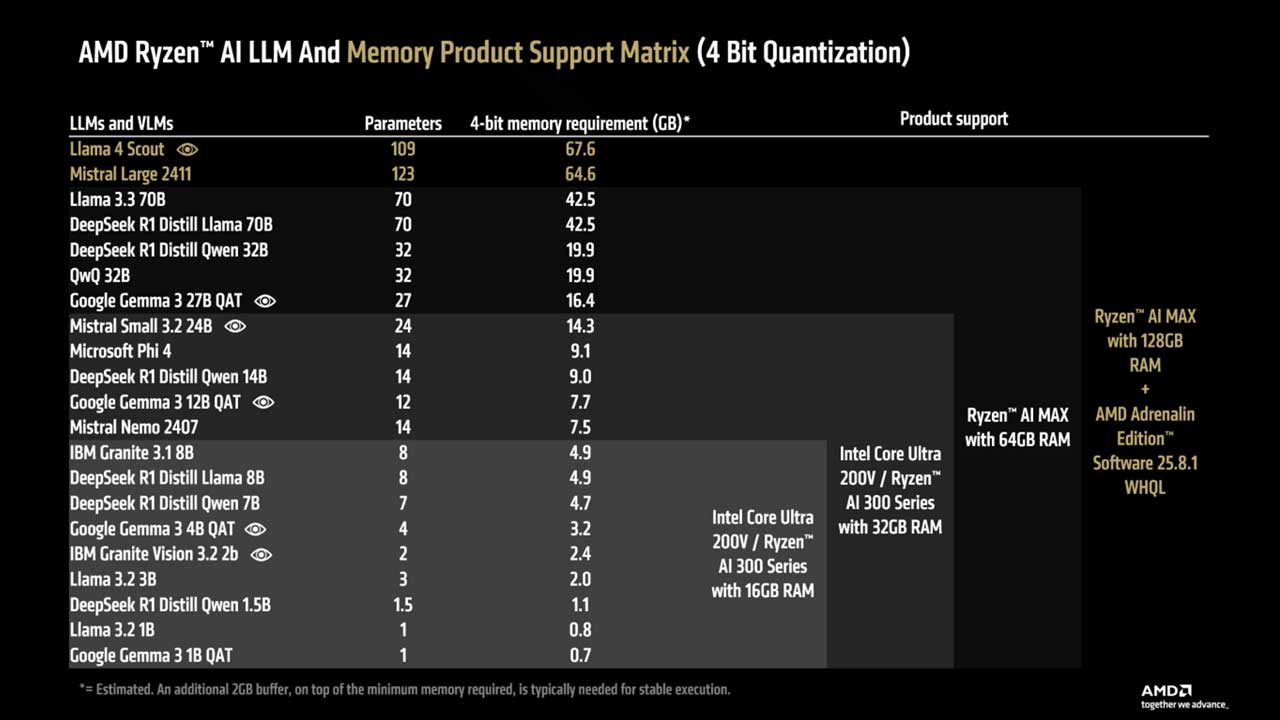
- Casual User: A Ryzen™ AI 300 series with 16 GB of RAM is a cost-effective solution for running an offline AI assistant like Google Gemma 3 4B QAT.
- Advanced User: For higher quality answers, a Ryzen™ AI 300 series with 32 GB of RAM can run more capable models like Google Gemma 3 12B QAT.
- Power User: The Ryzen™ AI MAX+ series with 64 GB of RAM is recommended for those who don’t want to compromise on performance. This setup can run even larger models like Google Gemma 3 27b QAT or generate images with models up to 12B parameters.
- AI Enthusiast/Developer: For the highest quality models, the Ryzen™ AI MAX+ 395 with up to 96 GB of dedicated graphics memory (via a 128 GB system) is the top choice, capable of running 4-bit models up to 128 billion parameters.
Advanced Capabilities: MCP and Tool Calling
Model Context Protocol (MCP) allows LLMs to use “tools,” enabling them to perform actions beyond the chat window, such as opening your browser, reading files, or executing code. This turns the LLM into an active agent.
However, using these tools significantly increases the processing load and memory requirements, as the instructions and tool outputs add a large number of tokens for the LLM to handle. Not all LLMs are equally proficient at using tools, though newer models generally have a stronger focus on this capability.