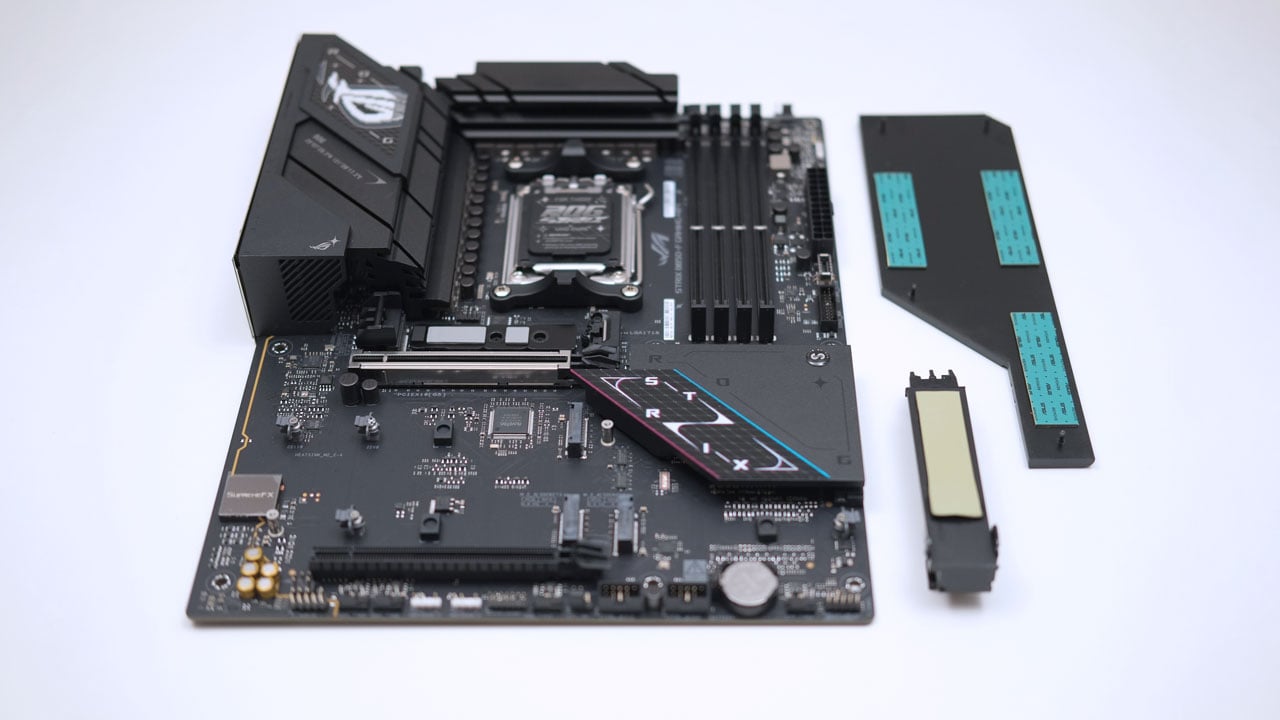
What we have for review is the ROG Strix B850-F Gaming WiFi motherboard. This is one of ASUS’ latest ATX motherboards based on the AMD B850 platform with support for the Ryzen 9000, 8000, and 7000 series processors.
Disclosure: ASUS sent the ROG Strix B850-F Gaming WiFi for the purpose of this review. They did not ask me to say anything particular about it.
Table of Contents:
Technical Specifications
The ASUS ROG Strix B850-F Gaming WiFi features four DDR5 DIMM slots, two PCIe slots, and four M.2 slots. Additionally, the B850-F Gaming WiFi is equipped with an integrated Realtek ALC4080 audio, Wi-Fi 7, Bluetooth 5.4, and a variety of USB ports.
| Processor | |
|---|---|
| CPU | AMD Ryzen 9000, 8000, 7000 Series |
| Chipset | AMD B850 |
| Socket | AMD AM4 |
| Memory | |
| SDRAM | DDR5 |
| Interface | 4x LO-DIMM |
| Channel | Dual Channel |
| Speed | 8000+ MT/s |
| Capacity | 256 GB |
| Graphics | |
| GPU | Integrated |
| Multi-GPU | N/A |
| Expansion | |
| PCIe |
|
| Storage | |
| Interface |
|
| RAID |
|
| Network | |
| Ethernet | Intel 2.5 Gbps |
| Wi-Fi | Wi-Fi 7 |
| Bluetooth | Bluetooth 5.4 |
| Audio | |
| DAC | Realtek ALC4080 |
| ADC | Realtek ALC4080 |
| Amplifier | Savitech SV3H712 AMP |
| Channel | 7.1 |
| Connectivity | |
| External |
|
| Internal |
|
| Dimensions | |
| Length | 305 mm |
| Width | 204 mm |
| Height | 50 mm |
| Weight | N/A |
Packaging and Accessories
The Strix B850-F Gaming WiFi comes in a classic ASUS ROG packaging – complete with a generous assortment of accessories.
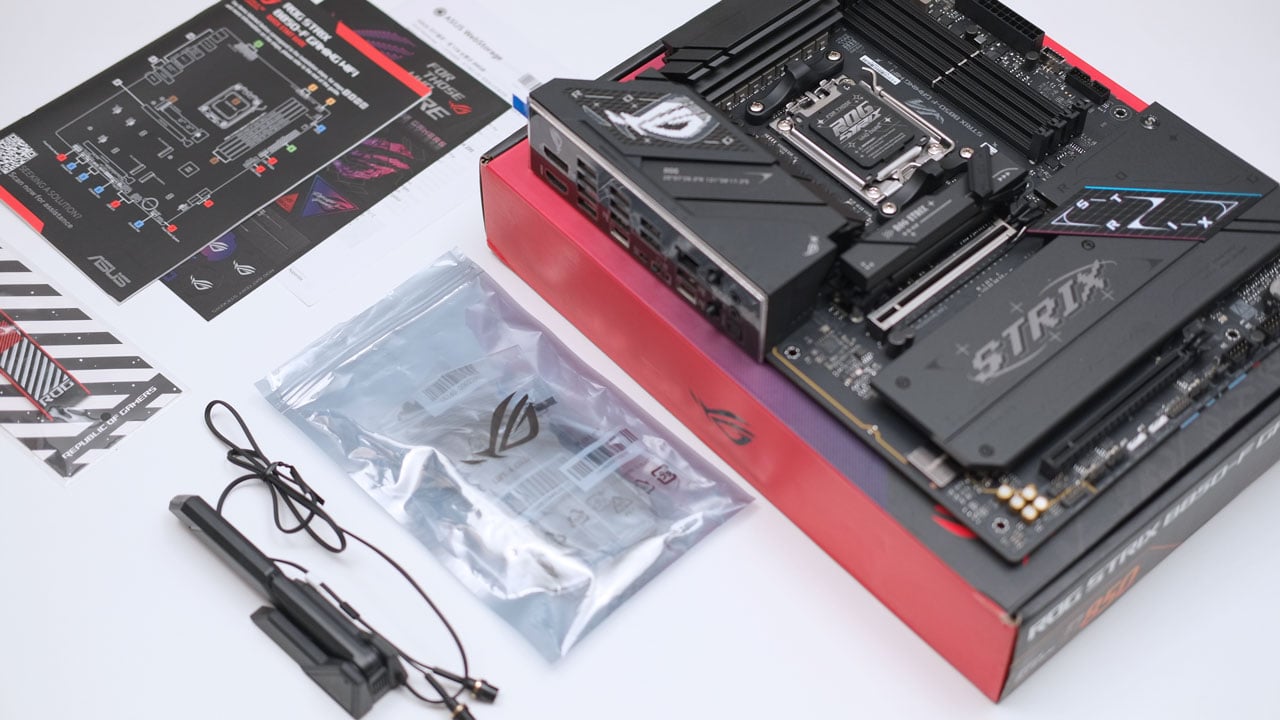
Scope of delivery are as follows:
- ASUS ROG Strix B850-F Gaming WiFi motherboard
- 2x SATA 6 Gb/s cables
- ASUS WiFi Q-Antenna
- Cable ties package
- M.2 Q-Latch package
- M.2 Q-Slide package
- ROG key chain
- ROG Strix stickers
- 4x M.2 rubbers
- Documentation
Design, Build and Connectivity
The ASUS ROG Strix B850-F Gaming WiFi is a proper ROG ATX motherboard. Even with its more modest positioning, ASUS hasn’t skimped on quality components. It features a 16 + 2 + 2 power solution rated for up to 80A per stage, all kept cool with robust VRM heatsinks.

The back of the B850-F highlights ASUS’ impressive quality control. The motherboard features surface-mounted DRAM slots and a PCIe 5.0 slot equipped with a convenient quick-release mechanism.

Although the B850-F Gaming WiFi could accommodate more PCIe slots, it includes only two. In return, it supports four M.2 slots, with two featuring PCIe 5.0 x4 interfaces. For cooling, the primary M.2 slot is equipped with a quick-release heatsink, while the remaining slots share a large surface area heatsink.

The B850-F Gaming WiFi motherboard packs a solid range of connectivity options, including full-sized HDMI and DisplayPort outputs, two USB Type-C ports, and several USB Type-A ports. However, it lacks USB4 and Thunderbolt options, relying more on a number of legacy USB 2.0 ports.
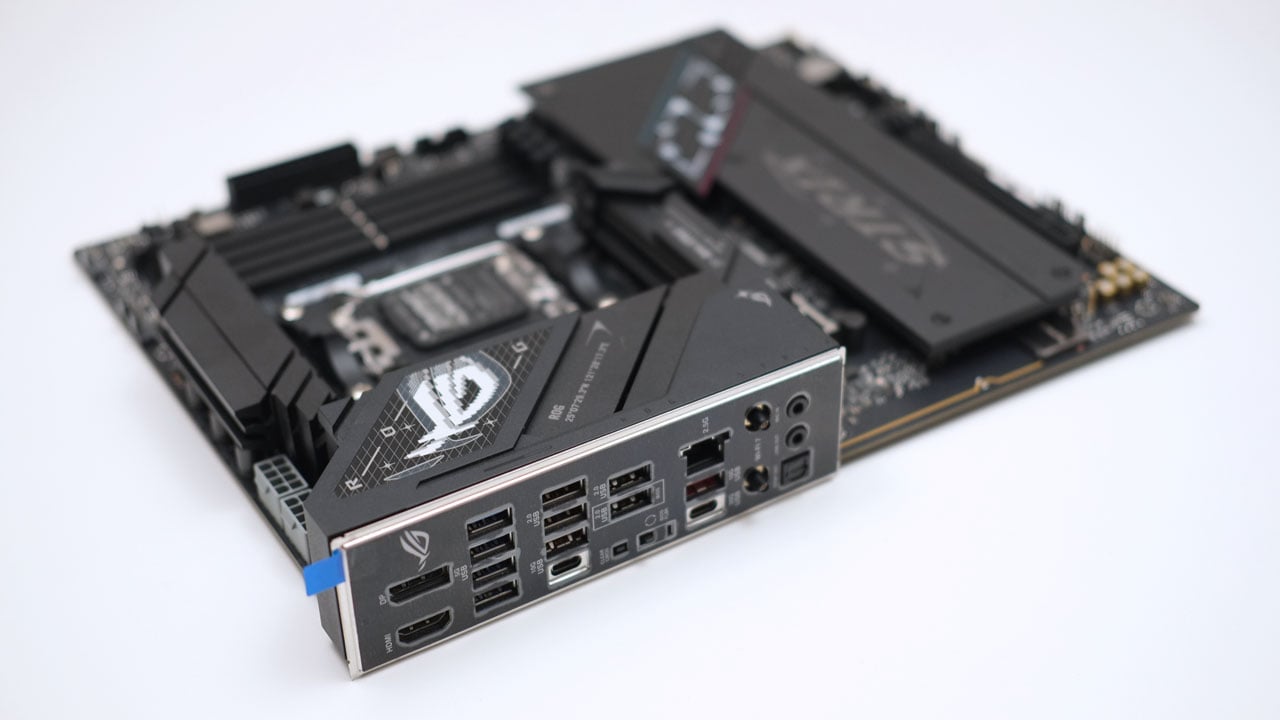
The B850-F offers 2.5 GbE LAN, Wi-Fi 6E, and three audio interfaces. It features 7.1 surround sound through optical output, while the 3.5 mm jacks support line-in and line-out with impedance and device sensing functions.
Firmware
ASUS has done an excellent job with the UEFI design on the B850-F Gaming WiFi, delivering a clean and intuitive “splash” interface. They’ve finally replaced the quasi-HD layout with a 16:9 aspect ratio Full HD compatible UEFI. Great work, ASUS!

Advanced Mode offers eight submenus, including the AI Tweaker, which allows precise control over CPU and DRAM tuning. You can also choose an AMD or ASUS performance profile, or combine elements of both, and make further adjustments to suit your preferences.

The Q-Fan Control has received an upgrade, similar to the enhancements on the B860-I Gaming WiFi motherboard. The new version features numerical controls for thermal and duty cycle settings, expanded sensor data, and more options for customization.

The ASUS Q-Dashboard offers a simple overview of hardware connections and relevant BIOS settings when available, making it a useful troubleshooting tool for devices connected to or installed within the motherboard.

Software
The ASUS ROG Strix B850-F Gaming WiFi is compatible with the Armoury Crate software suite. It also offers access to ASUS DriverHub, a tool I find more convenient in comparison. DriverHub serves as a web-based download manager, simplifying the process of finding and installing the required drivers and software for the motherboard.
The full list of bundled software are as follows:
- ROG CPU-Z
- Dolby Atmos
- Armoury Crate
- AIDA64 Extreme (60 days free trial)
- Aura Creator
- Aura Sync
- Fan Xpert 4
- GameFirst
- HWiNFO
- Power Saving
- ASUS DriverHub
- ASUS GlideX
- TurboV Core
- Adobe Creative Cloud (Free Trial)
- Norton 360 for Gamers (60 Days Free Trial)
- WinRAR (40 Days Free Trial)
Processor
The general processing performance of the B850-F Gaming WiFi motherboard was tested using the AMD Ryzen 9 7900X CPU and TEAMGROUP T-FORCE Vulcan α DDR5-5600 memory kit. The evaluation included Normal and PBO Enhancement profiles, with Normal mode showing better overall performance in FPU benchmarks.
Memory
Memory performance noticeably improves with PBO Enhancement enabled, even with the memory operating at its default clock speeds.
Graphics
GPGPU performance with integrated graphics is quite similar across both tested profiles, though the PBO Enhancement mode provides a minor speed advantage.
Storage
The storage performance of the B850-F Gaming WiFi is on par with other AMD motherboards featuring similar interfaces.
As for USB performance, the B850-F offers decent throughput across the tested interfaces.
Network
Wired network performance is on par with other 2.5 Gbps NICs I’ve tested. Wireless on the other hand has been tested with a Wi-Fi 7 capable network with pleasing results. Note that I have tested this on a Wi-Fi 6E standard.
Audio
The ASUS ROG Strix B860-I Gaming motherboard features the Realtek ALC4080 audio codec paired with the Savitech SV3H712 amplifier. Both line-in and line-out showcased an almost identical result and they are within the safe margin compared to other onboard audio solutions that I have tested.
| Multitone | Audio | ||
|---|---|---|
| Test Options | Line-In | Line-Out |
| THD (dB) | -95.9 | -95.9 |
| TD+N (dB) | -75.1 | -75.1 |
| Noise (dB) | -79.2 | -79.3 |
| N+D (dB) | -76.1 | -76.1 |
| SNR (dB) | 78.3 | 78.3 |
| ENOB (bits) | 14.1 | 14.1 |
Temperature
The B850-F Gaming WiFi boasts outstanding VRM thermals, reaching a maximum of only 52 °C with the PBO Enhancement profile.
Power
System power consumption stays low at idle across all tested profiles, with PBO Enhancement taking the lead. However, under load, PBO Enhancement becomes noticeably more power-hungry. Personally, I’d stick to Normal mode to keep thermals and power consumption in check, as the minor gains with PBO Enhancement just don’t justify its use.
Final Thoughts
The ASUS ROG Strix B850-F Gaming WiFi proves to be a well-rounded motherboard for AMD’s latest Ryzen processors. It successfully marries the premium build quality and robust power delivery expected from the ROG brand with a forward-thinking feature set, including dual PCIe 5.0 M.2 slots and Wi-Fi 7 support. Highlights include excellent VRM thermal performance, the upgraded Full HD UEFI, and an easy out-of-the-box setup, all of which greatly improve the overall user experience.
While it makes logical trade-offs – such as prioritizing M.2 storage over additional PCIe slots and omitting USB4 connectivity – these choices align perfectly with the needs of its target audience: gamers and builders who want a stable, feature-rich, and cool-running platform. Again, the out-of-the-box performance is excellent, and for most users, the standard profile offers the best balance of power and efficiency without significant thermal and power penalties.
Overall, the ROG Strix B850-F Gaming WiFi is an easy recommendation for an ROG motherboard under the $300 mark. It delivers the core essentials of a high-end motherboard at a more accessible price point, making it one of the most compelling and balanced options for anyone building a new Ryzen system.
ASUS ROG Strix B850-F Gaming WiFi $265

Product Name: ROG Strix B850-F Gaming WiFi
Product Description: The ROG Strix B850-F Gaming WiFi is an ATX motherboard from ASUS, designed to support the AMD B850 platform and is compatible with Ryzen 9000, 8000, and 7000 series processors.
Brand: ASUS
Summary
The ASUS ROG Strix B850-F Gaming WiFi is a high-quality, cool-running motherboard that excels with its strong power delivery, superb UEFI, and focus on high-speed M.2 storage.
Pros
- Excellent build quality with a robust 16+2+2 power solution
- Outstanding VRM cooling, with temperatures staying very low under load
- Future-proof storage with four M.2 slots, two of which are PCIe 5.0
- Improved and intuitive Full HD UEFI interface
- Modern connectivity including Wi-Fi 7 and 2.5 GbE LAN
- User-friendly features like the PCIe and M.2 slot quick-release mechanisms
Cons
- Limited expansion with only two physical PCIe slots
- Lacks the latest I/O, such as USB4 or Thunderbolt ports
- PBO Enhancement profile offers tiny performance benefits for a significant increase in power draw